How to Download All Attachments from an Airtable Record
Airtable has no native button for bulk attachment download, and a longstanding community request for one has gone unanswered since 2018. Here are the methods that actually work, ranked by speed and effort.
Short answer: Airtable does not give you a one-click way to grab every attachment on a record. The fastest method is the Airtable Attachment Downloader browser extension, which adds a Download attachments button to every table — the whole table or just the rows you ticked, renamed after any field, no setup and no API key. Custom API scripts, the marketplace app, and miniExtensions all work but are slower, more technical, or subscription-priced.
 Add to Chrome - Free
Comparison at a glance
| Method | Time for 20 files | Setup | Files in one ZIP | API key needed | Cost |
|---|---|---|---|---|---|
| Manual one-by-one | ~5–10 min | None | No | No | Free |
| Custom Airtable API script | ~1–2 hrs first time | High (code + token) | Yes (if coded) | Yes | Free |
| Marketplace "Bulk Download Attachments" app | ~1 min | Per-base install | Yes | No | Paid Airtable plan (extensions gated) |
| miniExtensions bulk download | ~1 min | Account + connect base | Yes | OAuth | Free ≤10 records, then $19–29/mo |
| Attachment Exporter (marketplace) | ~1 min | Account + connect base | Yes | OAuth | Free ≤10 files, then $9/mo |
| Browser extension (recommended) | ~10 seconds | One click | Yes | No | Free / $3.99–4.99 mo Pro |
| Third-party backup service | Varies (whole base) | Account signup | Yes | OAuth | $10–50+ /mo |
Method 1: Download attachments manually, one at a time
The default Airtable experience. Expand the record, open each attachment in the preview, and click Download. For a record with many files across several attachment fields, this is a lot of clicking — and each file lands loose in your Downloads folder.
Pros
- Zero setup, works on any device
- Free, no third-party tools
Cons
- Each file is a separate open, click, and save
- No ZIP — files pile up individually
- Painful for records with 10+ attachments or multiple attachment fields
Use this if: the record has only a couple of attachments and you rarely do it.
Method 2: Write a script against the Airtable REST API
If you code, you can use a personal access token and GET the record to read its attachment objects, each of which has a url and filename, then download every file. Note that Airtable attachment URLs now expire after a couple of hours, so the fetch has to happen promptly.
Pros
- Fully automatable for recurring backups
- Custom output: rename, sort, sync to S3
Cons
- Requires programming knowledge
- Personal access token setup and scoping is friction
- Expiring URLs break naive scripts
- Not realistic for non-developer teammates
Use this if: you're a developer building an automation pipeline.
Method 3: The Airtable Marketplace "Bulk Download Attachments" app
Airtable's extension marketplace has a bulk-download app. It works inside the base, but marketplace extensions are effectively gated behind paid plans (the Free plan allows a single extension per base, removed on downgrade), and it has to be added per base by someone with the rights to do so.
Pros
- Native to Airtable, lives inside the base
- No API key for the end user
Cons
- Extensions are gated behind paid Airtable plans
- Installed per base, by an editor/owner
- Not available to viewers or on the Free plan long-term
Use this if: you're on a paid plan and want a base-native tool.
Method 4: miniExtensions bulk download
miniExtensions offers a hosted "bulk download attachments" tool. It's capable, but the free tier is capped at 10 records and paid plans start at $19/month billed yearly, or $29 monthly — a subscription on top of your Airtable plan for something you may only need a few times a year.
Pros
- Works at table/view scale
- Filtering and organizing options
Cons
- Free tier limited to 10 records
- $19/month billed yearly, $29 monthly, on top of your Airtable plan
- Connect-your-base OAuth setup
Use this if: you already pay for miniExtensions for other workflows.
Method 5: Use a browser extension (recommended)
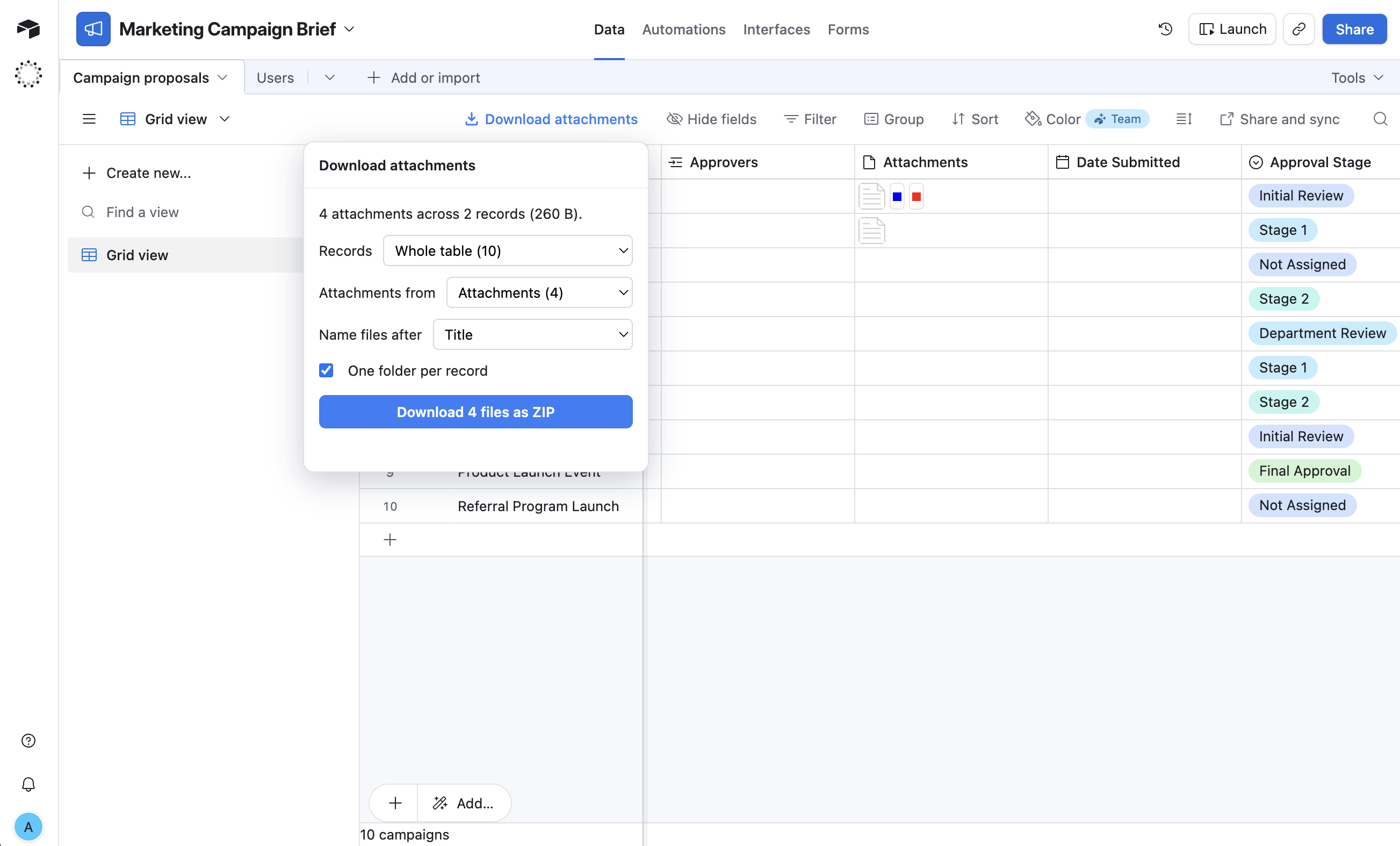
Airtable Attachment Downloader is a Chrome extension that adds a Download attachments button to every table. The whole table or just the rows you ticked, renamed after any field and sorted into one folder per record.
It uses your existing Airtable session, so there is no personal access token, no API key, no external software. The Pro tier names the ZIP after the record's title; the free tier uses a generic filename.
Pros
- One click, ~10 seconds for a record of any size
- No API key, no setup, no signup, no per-base install
- Works on every record across every base automatically
- Files arrive as a single ZIP (with smart naming on Pro)
- Immune to Airtable's expiring attachment URLs
- Files never touch a third-party server — downloaded directly in your browser
Cons
- Browser-only (no CLI)
- Free tier has a 10-downloads-per-month cap; unlimited is $3–4/mo
Use this if: you want the fastest path from “I need these files” to “I have these files.”
Method 6: Third-party backup services
Services like On2Air, ProBackup, and Rewind run scheduled backups of an entire Airtable base, including attachments. They're built for compliance and disaster recovery, not for grabbing files off one record.
Pros
- Automated, scheduled, full-base coverage
- Versioning and point-in-time restore
Cons
- Monthly subscription ($10–50+)
- Requires connecting your base to a third party
- Overkill for one record's attachments
Use this if: your org needs scheduled, audited backups of entire bases.
Just want the files? Install the extension.
Free for up to 10 downloads per month. No signup, no API key.
Add to Chrome - FreeFrequently asked questions
Does Airtable let you download all attachments at once?
Not from a record with a native button. Airtable has no built-in bulk attachment download. You either open each attachment individually, write a script against the Airtable API, use a paid marketplace extension or miniExtensions, or install a browser extension that adds a one-click Download all as ZIP button.
Can I download Airtable attachments without an API key?
Yes. A browser extension like Airtable Attachment Downloader uses your existing Airtable session, so no personal access token, API key, or external software is required.
Why did copying attachment URLs stop working?
In late 2022 Airtable made attachment URLs expire after a couple of hours, so old copy-the-URL workarounds now produce dead links. A browser extension avoids this because it fetches the files immediately inside your logged-in session.
What is the fastest way to download all attachments from a record?
A browser extension that adds a Download all as ZIP button to the expanded record. One click grabs every attachment across all attachment fields, with the original filenames preserved.
Is it safe to use a browser extension for this?
Airtable Attachment Downloader downloads files directly in your browser using your existing Airtable session. Files never pass through any third-party server, and the extension stores no personal data. See the privacy policy for details.